

A few years ago I was organizing my notes using the Zettelkasten method in VS Code. A lot has changed since then, largely due to the exponential growth of LLMs and agentic AI. I want to share a fresh tool stack that helps reduce cognitive load and keep information from slipping through the cracks when time is short: PARA × Obsidian × Granola × Claude.
The article is called «Second Brain,» which means we’re going to build a system that mirrors the structure of the human brain.
graph LR
    S@{ shape: text, label: "Sound" }
    T@{ shape: text, label: "Text" }
    I@{ shape: text, label: "Images" }
    S e1@--> A[**Auditory Cortex**
    *Captures and processes sound*]
    T e2@--> B[**Visual Cortex**
    *Captures and processes visual input*]
    I e3@--> B
    A e4@--> C[**Hippocampus**
    *Routes and indexes information*]
    B e5@--> C
    C e6@--> mem
    mem e7@--> F[**Prefrontal Cortex**
    *Analysis, planning, decision-making*]
    e1@{ animate: true, curve: linear }
    e2@{ animate: true, curve: linear }
    e3@{ animate: true, curve: linear }
    e4@{ animate: true, curve: linear }
    e5@{ animate: true, curve: linear }
    e6@{ animate: true, curve: linear }
    e7@{ animate: true, curve: linear }

    subgraph mem[**Memory**]
        direction TB
        short[**Short-term**] <--> long[**Long-term**]
    end
Elements of brain structure
PARA (Projects–Areas–Resources–Archives) is a simple information organization model developed by Tiago Forte. The idea is to divide everything into four directories: active Projects, ongoing Areas, Resources as a document store, and Archives for completed projects. Tiago wrote an entire book about this model in 2023, but in 2026 it’s more efficient to just ask an LLM for the details.
Obsidian is a free tool for organizing notes in markdown format. And for working with text it’s far more comfortable than VS Code: live-preview document editing, a rich plugin ecosystem, and a mobile app. I’ll keep VS Code for writing code and technical documentation, and use Obsidian for notes and knowledge base management. It’s simply better — give it a try.
I’ll admit, I genuinely love the fact that maximum productivity now requires writing in Markdown, having basic terminal skills, finally understanding what GitHub, MCP, RAG, A2A, and a bunch of other new AI technologies are. And I can see how much people close to technology are enjoying this shift. Tools that used to be exclusively for developers are going mainstream. GitHub is seeing profiles from designers, marketers, and specialists from completely non-technical fields — people who are writing skills for agents and launching their own side projects.
In 2025, 121 million new repositories were created on GitHub — a record in the platform’s history.
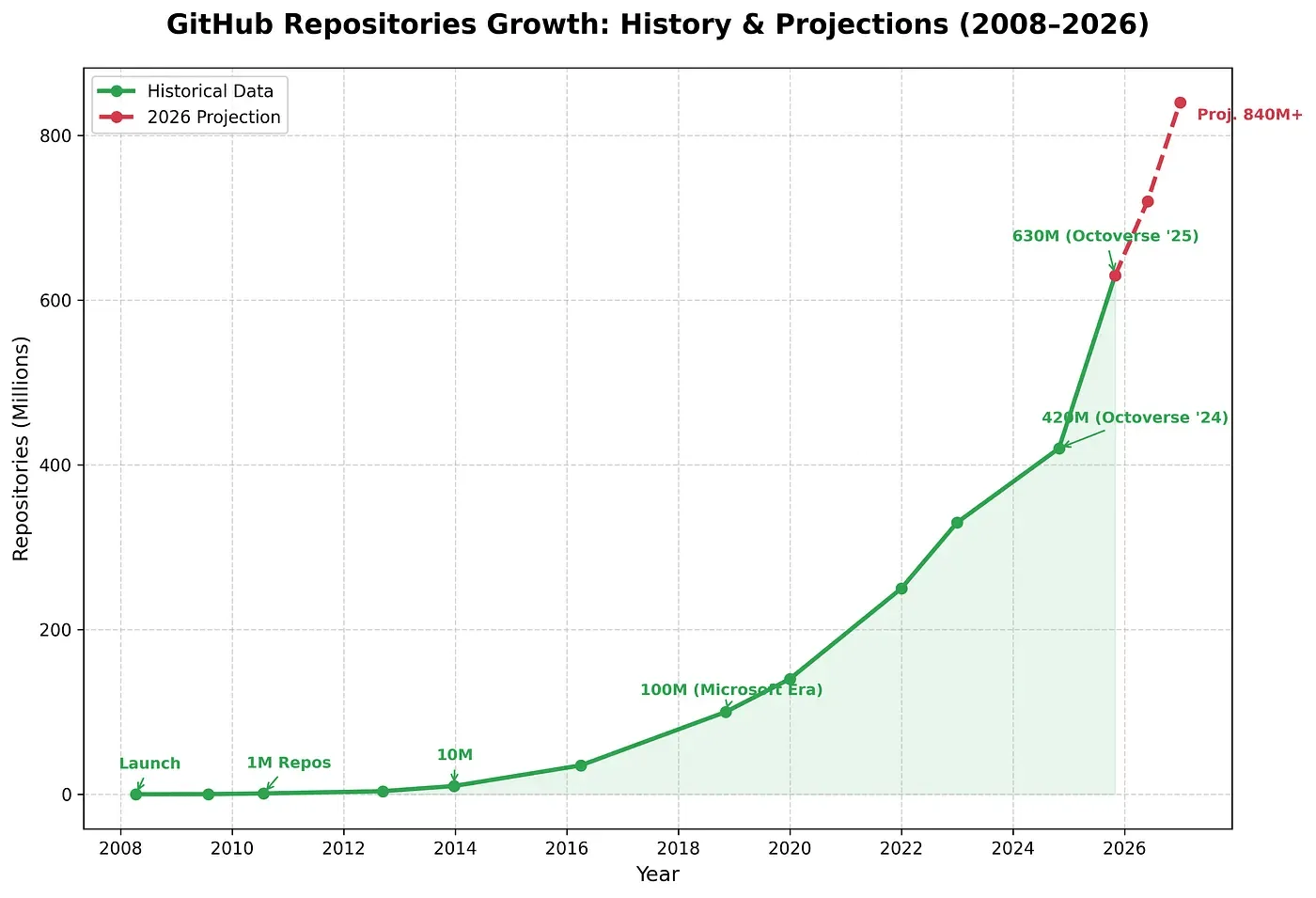
Number of repositories on GitHub
One more thing worth highlighting: markdown is a format that any LLM understands unambiguously, unlike .docx, .pdf, and other document formats. And it’s not just headings and lists — here’s the full spec. Markdown will outlive any tool. Evernote is dying, Notion will shut down someday, Google Docs is tied to an account — an .md file will open in any text editor 20 years from now. It’s plain text.
Granola is a service for recording, transcribing, and creating meeting notes. It works on both smartphone and computer, and handles both online and in-person meetings. It handles Russian well. Amusingly, Granola outputs md files (naturally), and one Obsidian enthusiast wrote a Granola-to-Obsidian plugin that syncs notes directly into your Obsidian workspace.
This raises an important information security question, especially when using the service for work. Transcription in Granola happens locally on the device — audio never leaves it. However, to generate notes, Granola by default sends the transcript to ChatGPT. So for that step, I use our internal corporate LLM instead.
Claude Code is an agentic AI with access to the file system — in our case, the Obsidian vault folder. It can read, edit, create, and analyze any files in that space. The name might suggest it’s only for writing code, but that’s not the case — it handles analysis and work on any text documents just fine. One interesting quirk: you interact with Claude Code through the terminal. But trust me, it’s intuitive enough that it doesn’t cause any real friction.
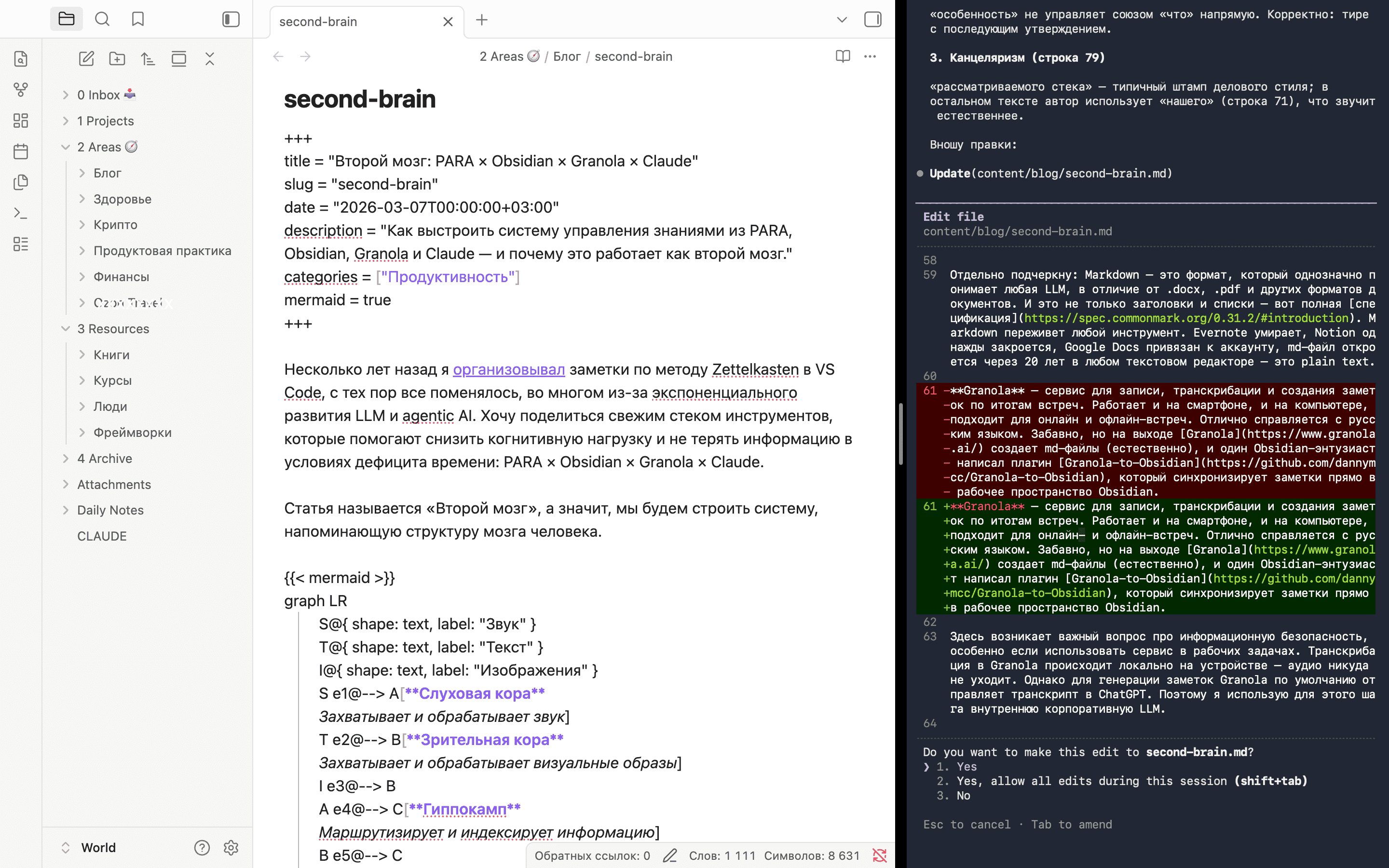
Obsidian and Claude Code CLI
Claude has other interfaces too: web, desktop, mobile app, and extensions for Chrome, Excel, and PowerPoint. Each covers its own use cases, but none of them have direct access to files in the Obsidian vault — which means in the context of our smart stack, Claude Code is the key tool.
What tasks to delegate to Claude is a personal decision. My rule is simple: I only delegate what I can verify. Either I understand how to do it myself and Claude is saving me time — or I know exactly what output I want and can evaluate the result.
By the way, I’m writing this article together with Claude — he points out where the text sounds awkward or ambiguous, fixes typos, processes images, tweaks CSS styles, and helps with diagrams. Claude helped me migrate all the posts from my old WordPress blog to a new one on Hugo in a single evening — I’d been planning to do it for a long time, but before LLMs could write code, the task felt pretty daunting.
Worth noting: the files Claude Code accesses are sent to external servers. But there are solutions for sensitive data: a corporate version where data stays within your own infrastructure and is legally protected, or even local deployment with open-source models via Ollama.
Let’s return to the analogy between this stack and the structure of the human brain:
graph LR
    S@{ shape: text, label: "*Sound*" }
    T@{ shape: text, label: "*Text*" }
    I@{ shape: text, label: "*Images*" }
    S e1@--> A[**Auditory Cortex**
    Granola]
    T e2@--> B[**Visual Cortex**
    /Resources]
    I e3@--> B
    A e4@--> C[**Hippocampus**
    PARA]
    B e5@--> C
    C e6@--> mem
    mem e7@--> F[**Prefrontal Cortex**
    Claude Code]
    e1@{ animate: true, curve: linear }
    e2@{ animate: true, curve: linear }
    e3@{ animate: true, curve: linear }
    e4@{ animate: true, curve: linear }
    e5@{ animate: true, curve: linear }
    e6@{ animate: true, curve: linear }
    e7@{ animate: true, curve: linear }

    subgraph mem[**Memory**]
        direction TB
        Obsidian@{ shape: text, label: "Obsidian vault" } ~~~
        short[**Short-term**
        /Inbox
        /Projects] <--> long[**Long-term**
        /Areas
        /Archive]
    end
The stack as an analogy for brain structure
Each tool in the stack plays its own role: Granola captures the incoming stream (auditory cortex), PARA routes information (hippocampus), Obsidian stores knowledge (memory), and Claude Code analyzes and helps make decisions (prefrontal cortex).
I arrived at this stack after a long series of experiments and a struggle with the chaos of scattered document storage spread across a local drive, cloud services, Telegram saved messages, and various to-do apps. So far — smooth sailing.